5.13.2009

Sony Ericsson XPERIA X1 – User Reviews

4 comments


User reviews – GSM Arena.

  • Anonymous


Got my X1-Silver addition 3 months ago, with in the first 3 weeks the phone started lagging, then stopped(unresponsive for minutes on end). And finally the phone went completely hey-wire!! Started making phone calls by it self, touch the messaging and it starts typing by itself. I'm a big SE fan, and for that reason tried to be logical. Run an update, and the update fixed the phone for about 2 days. And again all problems returned, worse than ever!! So called SE technical department. ANSWER: Your phone's hardware is damaged.
I'm like HUH!! this phone 3 weeks old. Try that for bad luck. If i weren't a SE fan i would have snapped the phone in half.
Conclusion: I sent it in, they replaced the defective hardware, 2 weeks later i had my phone and it works like a charm now! Pitty they didn't include the Xenon Flash like my K850i. Other than that - GREAT Phone!!


malaputu

I've use X1 for 1 month a go and very like this smartphone cause X1 have more all feature that i need and i'm use for my bussines everyday. X1 is a good performance for push email and i'm used for several account; live.com, gmail and yahoo. All account it's work great for pushemail and very past as item arrive (paster than my Laptop that using WIFI in my office).
Beside that, when i'm at my office i can use wifi network and it
s work grat too. The cameraand keyboard is ok and easy to use.
X1 can be intall 3 party application like TFD 3D as good as original TFD 3d for HTC touch.
Conclusion, X1 is better that blackberry and omnia, HTC


  • Anonymous


No youtube is free and the x1 has a good browser as well. The x1 has a small appsotre called sonyericsson fun which allows you to download facebook panells etc


Ary

I own this for 1 month, really love it and loving it more each day.
Long battery life, very good performance.
I installed Touch-IT Rom v5 and It is great.
using this new ROM, I have YouTube app which make it really enjoyable to watch youtube also.


Pete

Yes the X1 can play youtube,
Method 1: go into Pocket Internet Explorer or Opera Browser, turn on wi-fi, or turn on 3G, and then type down www.youtube.com
It will ask you if you want to download youtube cab. Say yes, install the youtube.cab and then open the program. It will have a youtube application to search and play youtube videos
Method 2: go to XDA forums and then look for youtube cab. This cab is different, it is harder to find, but it is much funner to use than the other youtube program.


Anonymous

I find it extremely amusing reading through some of symbian/Nokia fanbois posts. Obviously deluded individuals with little or no understanding of operating systems.
I'd strongly recommend running the hell away from Symbian. It's awful.
Let us gloss over the lousy documentation (in which it's impossible to find anything, and where there are no links between chapters --- so, e.g., you can't follow a superclass chain up through the S60 chapter into the Symbian core chapter). Let us also gloss over the lousy build system (a horrible maze of crappy perl scripts, which, apart from being so hideously slow that our project takes the best part of ten minutes to build even if no source files have changed, doesn't allow you to have two source files in the same project with the same name. Even if they're in different directories). Let us also pass quickly over the debugger, trying not to make eye contact, that's unreliable, will only let you debug one task at a time, and which tends to crash if you do the wrong thing.
No, let's talk about the language.
You program for Symbian in C++. Good, you might think. No. This is C++ with all the good bits taken out and replaced by badly designed bits.
Let's take exceptions. There are no C++ exceptions. What there are instead are Leave codes; a macro-and-longjmp framework that replaces exceptions which allows you to throw an integer value and then catch it further up the call stack. Unfortunately because this is implemented without compiler assistance it doesn't unwind the stack frame, so destructors of locals aren't called! All is not lost, though: there's a complicated and easy-to-get-wrong manual cleanup stack on which you can push stuff that you want the system to free for you in such situations. God help you if you forget to push something, or pop something at the wrong point...
Let's take strings. There's no standard string class, of course. What there are are an even dozen different classes for storing strings in different ways: on the heap, on the stack, constant strings owned by someone else, etc. There are some superclasses that will allow you to pass references to these things around without having to worry about the implementation.
Except... it doesn't actually work. The various different string superclasses are incompatible. You can cast a TDes (mutable abstract string) to a TDesC (immutable abstract string). You can't cast a TPtr (mutable pointer to mutable string data) to a TPtrC (mutable pointer to immutable string data). Some of their system functions require you to pass in a reference to a concrete string type, so god help you if want to use a different implementation. You can't use certain implementations in certain contexts. The result is that for some operations you have to allocate a fixed-size buffer on the stack, call a system function to populate it, then copy the buffer into another buffer on the heap, because the buffer-on-heap object is immutable! Despite being resizeable and assignable!
Things get even worse when you want to store multiple strings. There's a labyrinthine maze of string array classes: arrays of fixed sized strings, arrays of descriptors, arrays of pointers to strings, arrays of pointer strings (which are different)... add this to Symbian's bizarre convention where a data storage class allocates memory in its constructor but does not free it in its destructor (which means the user must manually Close() method on all member variables) and simply figuring out who's responsible for freeing a particular object becomes non-trivial. I once spent three days trying to find out how to store an array of strings without leaking them. I kid you not.
(To be fair, they have been trying to fix this with OpenC++, a new programming environment based on, like, standards. It doesn't actually work. The interface to Symbian C++ code is patchy and poorly specced which means it's only really useful for running chunks of third-party code in a sandbox --- you still need to write your actual application in Symbian C++.)


  • China Boy


HI All,
Those who are intending to buy this phone I can tell you this a fantastic piece. Only thing is that you will take time to get use to it. But once you understand this is the best Windows Mobile phone I ever had. Its just like a pocket PC.
Battery life: almost 3 days.
Screen: Superp glowy and glossy (best of the lot)
reception: Good
Speaker phone: Not Good
Camera: Good as compared with Mobile camera.
GPS: Google map is amazing.
Wifi: Strenth of the wireless router poor.
surfing net through EDGE: Good
MSN & SKYPE works well
Do not support South East Asian language: Hv to download the language pack which is very hard to find. If needed I can help. check my previous post for my email.


5.12.2009

Sony Ericsson XPERIA X1 – Specifications

0 comments


Battery Life

  • Talktime 10 hours
  • Standby time 833 hours

Camera

  • Camera resolution 3-megapixel
  • Camera flash LED
  • Video capture Yes

Connectivity

  • Network(s) GSM 850, GSM 900, GSM 1800, GSM 1900, UMTS 850, UMTS 2100
  • Wireless technology Bluetooth, Wi-Fi (802.11b/g)
  • Data Services GPRS, WAP, EDGE, UMTS, HSDPA
  • GPS receiver Yes
  • USB Yes

Display

  • Screen resolution 800 x 480 pixels
  • Number of colours 65K

Entertainment

  • Games Yes
  • FM radio Yes
  • Video player Yes

Functionality

  • Input method QWERTY keyboard, Touchscreen
  • Polyphonic Yes
  • Ringtone options Monophonic, Polyphonic, MP3
  • Digital camera Yes
  • Synchronisation method(s) USB2.0, ActiveSync
  • Operating system Windows Mobile 6.1
  • Supported audio file formats AAC, MP3, Real Audio, WMA
  • Supported video file formats MPEG-4, WMV
  • Supported picture file formats JPG
  • Web browser Yes
  • Java Yes

General

  • Dimensions (W x D x H) 110 x 17 x 53 mm
  • Weight 145 g
  • Processor Qualcomm MSM7200
  • Processor speed 520 MHz
  • RAM 256 MB
  • ROM 512 MB
  • Availability Telstra

Memory

  • Expansion slot microSD
  • Memory card included 4GB

Messaging

  • Messaging capabilities SMS, MMS, E-mail, Instant Messaging
  • Email protocols POP3, IMAP4, SMTP
  • Push e-mail Yes

Other

  • Phone type 3G, Multimedia, Business, Smartphone, GPS
  • Form factor Slider
  • Included accessories Manual, Software (Windows), Charger, Stereo headset, USB cable

5.10.2009

Sony Ericsson XPERIA X1 - Review

0 comments
 
 
  • Good: Sharp, business-like design • Arc Slider and QWERTY keyboard • Full range of connectivity • Hi-res display
  • Bad: Frequent lag spikes • Average battery life • Most available Xperia Panels are poorly designed

    Specs: Bluetooth, Wi-Fi (802.11b/g) • GPRS, WAP, EDGE, UMTS, HSDPA • 3-megapixel • microSD •

    Design
    For once, the photoshopped images haven't lied. The X1 is every bit as stunning in the flesh (or in the brushed metal, as the case may be). The arc-slider slips fluidly on its rails with a satisfying snap when opened or closed. The four-row QWERTY keyboard is excellent, even if it seems a tad too small at first glance. Using the keyboard is easy, even at night, thanks to its bright backlighting and well spaced buttons. Unlike many keyboards on smartphones the X1 dedicates buttons to common punctuation, saving you from having to dip into symbol menus to find an "@" symbol for email addresses, etc.

    The touchscreen has a WVGA resolution (800x480) which is 2.5 times higher than that of the iPhone 3G. This sounds like a good thing, and for watching videos it is; however, we've found this resolution fills the screen with sharp, but tiny characters. Some menus, like the alphabetical listing in the contacts menu, is entirely illegible because the letters become so small. Even with the fonts adjusted to the largest setting we've still struggled to read some elements of the screen.

    Importantly, this means the X1 isn't a finger-friendly touchscreen. During our testing, we've relied on the stylus for input more than with any touchscreen we've seen for a long time. This is disappointing; using the stylus significantly slows down input and hampers the usability of a touchscreen phone.

    Panels
    Sony Ericsson is putting a lot of faith in its extensive Windows Mobile skin called the Xperia Panels. While companies like HTC also skin WiMo with a custom interface to increase ease of use, the Xperia Panels is a system offering numerous interface options.

    Our first impressions of the Panels weren't particularly favorable. The seven pre-installed Panels range from being too cluttered to use to being utterly useless. For example, one of the more attractive panels featuring three swimming goldfish barely shows notifications and offers no shortcuts to frequently used apps — hardly an interface you'll leave active for very long.

    It wasn't until we downloaded a Facebook panel and another by Windows Mobile modders Spb that we saw how excellent this system could be. The Spb Panel acts exactly like the one the company designed for all Windows Mobile handsets, and the Facebook Panel is as good as any app on the iPhone — in fact, it looks more like an iPhone app than a WiMo app.

    Features
    Under the Panels the X1 is a pretty standard Windows Mobile. At its announcement during World Mobile Congress earlier this year, the X1 was set to be best-in-show, with features to blow everyone else out of the water. That was almost a year ago and now the X1's connectivity combination of HSDPA, Wi-Fi and AGPS isn't exciting, but is nonetheless essential to the productivity of customers looking to use the phone for business purposes.

    For pleasure seekers, the X1 is a pretty mean multimedia machine. As mentioned above, videos look amazing on the the high-res display, and one of the pre-installed panels is the Sony Ericsson Walkman music player menu. Our only recommendation is that you upgrade the bundled headphones to a pair capable of producing a well-rounded sound — the 'phones in the box are too light on bass to be of much use.

    The X1 also sports a 3.2-megapixel camera with auto-focus and an LED photolight. These specs aren't extraordinary for a Smartphone these days, but its performance was much better than expected. The photos we took during testing showed good colour and focus, and even photos at night turned out well — the bright LED managing to illuminate subjects within about two meters of the lens.

    Performance
    Exploring the phone's performance, through accessing common apps and the menu structure, has provided us with a real mixed bag of results. The X1 runs a 520MHz Qualcomm processor with a massive 256MB RAM, and for the most part this is sufficient. Executing Java apps and opening menus is pretty pacey, and launching other programs, like Opera Mobile, requires only a few seconds of loading time.

    Xperia Panels seems to require more resources, however. We noticed considerable lag between pressing the Panels' soft-key and having the interface active, and again after a Panel was selected. For this reason we tended to remain in the panel we found most useful, though this obviously defeats the purpose of having nine active panels to choose from.

    Responsiveness, or the lack thereof, seems to be the crux of the first impressions for just about everyone we showed this phone to. While executing applications seem fine, there are too many times when the X1 stops responding to input — immediately after sending an SMS, for example.

    Battery life cycles were, in our experience, low to average. Sony Ericsson estimates a whopping 10 hours talk-time for its 1500mAh battery. We saw only about a day and a half between charges, with moderate use of calls and messaging, and push email active throughout the cycles.

    Overall
    More often than not, we either love or hate the phones we see. The X1 is a rare example of a Smartphone that has grown on us over the course of our review. The first few days tested our patience as we turned to the stylus too often, and indeed this element hasn't changed, but with the right Panel interface active, using the X1 is easy enough. In truth, we could do without the Xperia Panels. Of the 15 available at launch, we might use two, and the Panels system seems tremendously resource inefficient.

    That in mind, the X1 is a well-featured phone that checks all the important Smartphone boxes. We don't love the X1 — the frequent lag spikes are frustrating, and there are definitely cheaper and more intuitive smartphones available — but we think it's a gallant first attempt at a WiMo Smartphone and a very attractive handset at that.

    Thank You.
    CNET Aus

    UK market - Brand-new

    USA Market - Brand-new

  • 5.09.2009

    Nokia N97 pre-order in USA, Germany, Italy, Spain & Sweden!

    0 comments

    This is the Nokia Blog Announcement :

    Be the first to get your hands on an N97.

    Go to www.shop.nokia.com/n97 and enter your email address to join the N97 Pre-Order Members Club.

    Pre-ordering will guarantee you are one of the first to receive the new N97. It will be shipped direct to your door from the production line so you’ll have it the same day it hits the stores in your country. Stay tuned to the pre-order site if your country is not on the current list as it will gradually grow over the next few weeks.

    By registering for the Pre-Order Members Club you will also receive weekly emails giving you exclusive updates, freebies and informing you of competitions only available to you. You will also see the latest stories from the Nseries Blog that specifically relate to the N97.

    If you’re still undecided on pre-ordering your N97 just yet you can still join the Members Club in the meantime and enjoy the weekly updates and exclusive offers.

    screenshotN97

    Full Report

    5.07.2009

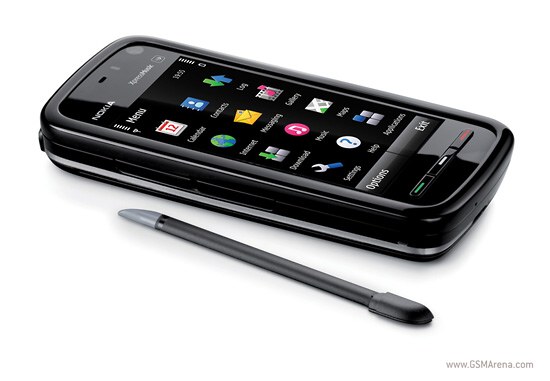
    Nokia 5800 Xpress music

    0 comments

    nokia-5800-express-music

    Its almost 4 months since Nokia released 5800 Xpress music edition, their first touch mobile device based on Symbian S60V5 . Nokia 5800 Xpress music edition is also known as Nokia Tube or iPhone Killer . At 320-350$ price , Nokia 5800 Xpress music edition has GPS , Bluetooth ,Youtube streaming ,Camera , WiFi , large screen display and many other features that are not even offered by phones falling in the same category . I would say its a best buy for your money .

    Nokia 5800 Xpress music edition features :


    Nokia 5800 Xpress music comes with a 640 x 360 pixels display with upto 16 million colors and an aspect ratio of 16:9 .
    ARM 11 369 MHz CPU, 128 MB of SDRAM memory .
    3.2 megapixel autofocus camera with dual-LED flash.
    Nokia OVI store and MySpace integration .
    Accelerometer sensor for automatic screen rotation with phone movement .
    Stylus, plectrum and finger touch support for text input and user interface
    Media bar for easy access to multimedia options .
    Nokia Nseries music player .
    Full web browser with HTML ,XHTML and WML support .
    Flash lite 3 for FLV and Youtube playback .
    WiFi and Bluetooth with A2DP .
    81 MB internal memory ,8GB microSD memory card in-box, which is expandable up to 16GB
    GPS with Nokia Maps 2.0 Touch application .
    Available in blue , read and black colors .
    This only a simple list features supported by Nokia 5800 Xpress music edition . Visit here to know more .
    The latest price of Nokia 5800 Xpress music is around 350 $ in US .


    UK Market :


    US Market:


    Photos:
    http://www.gsmarena.com/nokia_5800_xpressmusic-pictures-2537.php

    5.05.2009

    Nokia 5800 XpressMusic GSM Arena User Reviews

    0 comments


    Tony

    Nokia 5800xm is a nice phone...I can say this because I am using it since Jan'09...
    I had no problems with it. It has everything I was looking for in a phone. No real Hardware or software issue with my unit so far. Only rarely screen rotation doesnt work as desired & is not as responsive as other capacitive touch screen phones like Iphone.....But that doesnt mean its bad either..considering its resistive screen touch response is good....Its body is made of plastice so for some peoples it can be a negative but it still feels ok not that bad....It has got lots of featurs...but its a music centric phone....so its a real good muzic phone with excellent musical performance.....the rest featurs are bonus.


    But please make your choice based on what you are looking for in your phone & if 5800 has what you are looking for then it can be good choice.


    Winura
    the look of the phone does matter up to a certain extent but looks are not everything of a phone. the 5800 is far better than most of the fancy looking phones including the apple iphone. most people find it hard to use the fancy shaped phones. speaking of which, the ones who buy a certain phone for an actual purpose, to use day to day, the ones who actually use the functions and facilities of the phone.


    Dr Adedoyin

    I agree with you brynn. The ideal phone is a touchscreen with qwerty keyboard and preferably in symbian os. They are still restricted to high end phones in windows mobile os but i believe that with the financial success of 5800 and the advent of n97, we shall see progress in this direction and prices will come down. No justifications for the high price tag really. There are cheap qwerty keyboard phones like some LG phones and now we have reasonably priced touchscreen in 5800. Once the companies realise they can make profits by making the prices reasonable, it will be but a little time before these phones start hitting the market.


    Hisham

    Hey ppl...i`ve got this like a week ago and its such a top phone,im just loving it!!..
    No problems at all,battery life is pretty much long and the rest of the phone is just awesome..People if you going for this phone so please go ahead..You will LOVE it!

    Nazia Sweeeet

    I MADE IT !!!

    Hey Guyzz I have just updated my nokia 5800 from 20 version to 21 version from the mobile it self its very very easy and very simple nothing to worry I will share with you peoples hold on.

    Simple Steps :
    Type *#0000#
    Click Option
    Check for Update through your wifi connection or internet connection.
    here your updating started.
    Finally switch it OFF and then again re-start it after you see update completed other wise you will not be able to make any call out side.

    REMEMBER ALWAYS :
    When ever you update any thing in your Mobile or also in your Computer always shut down or switch OFF your mobile set then again switch it on.

    I hope I made it simply very very clear to all my Nokia 5800 Lovers, I really luv this phone a lot and I do care it as like my baby , Ooops me not married ..lolzzzz.

    Thanks Nokia for all your support & effort please kindly do something for yellow smily faces too. I hope Nokia is reading my comments on this and may very soon will be working on it.

    Looooooooong Live Nokia :-******
    Looooooooong Live Nazia :>))))))


    -----------------
    For more latest reviews :
    http://www.gsmarena.com/nokia_5800_xpressmusic-reviews-2537.php
     

    Mobile Phone Users Review. Copyright 2008 All Rights Reserved Revolution Two Church theme by Brian Gardner Converted into Blogger Template by Bloganol dot com